Red Apple with Worm Sticker Design
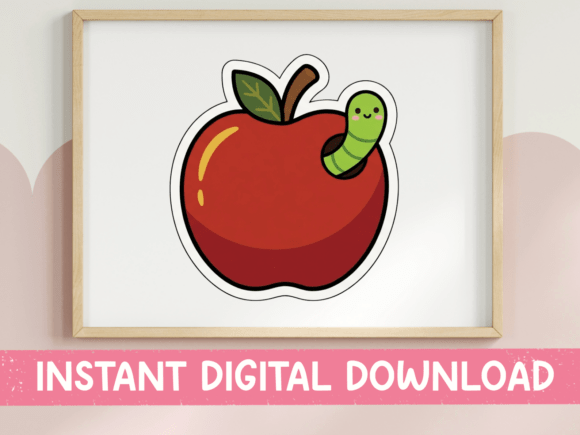
The classic image of a red apple is deeply embedded in our cultural consciousness, serving as an immediate symbol for education, health, and the start of a new academic year. However, adding a playful twist to this traditional icon can transform it from a simple graphic into a memorable design asset. The Red Apple with Worm Sticker Design captures this sentiment perfectly by combining the glossy, rich crimson aesthetic of a textbook-style apple with the whimsical charm of a tiny, smiling green caterpillar peeking out from the top. This specific design leverages thick black outlines and bold flat colors to create a clean, cartoon-like appearance that feels both nostalgic and modern.
For teachers, parents, and small business owners preparing for the back-to-school season, this digital asset offers more than just a cute picture; it provides a versatile tool for branding, gifting, and classroom decoration. Whether you are looking to create personalized gift bags for your students or want to add a touch of humor to your own teacher supplies, understanding how to utilize this SVG and PNG file set can elevate your projects significantly.
Understanding the Design Elements
At its core, this design is built on simplicity and clarity. The apple itself is rendered in a round, glossy style, using deep reds that pop against white backgrounds. A bright green leaf and a dark brown stem provide natural contrast, grounding the fruit in reality despite the stylized approach. The focal point, however, is the character element: a small green caterpillar with a friendly expression emerging from the apple’s crown. This detail adds personality and humor, making the design suitable for a wider audience than just formal educational materials.
The use of thick black outlines ensures that the design remains legible even when scaled down or printed on textured materials. This "bold flat color" technique is particularly effective for cutting machines like Cricut or Silhouette, where clean lines translate directly into precise cuts without requiring complex shading or gradient handling. For those using sublimation printing, the high-resolution PNG version ensures that the colors remain vibrant and the edges crisp, avoiding the pixelation that often plagues low-quality digital downloads.
Why Different Audiences Care About This Asset
Not every user approaches digital design files with the same goals. While a professional graphic designer might look at this asset and see a quick base layer for a larger composition, a busy teacher might see the solution to a last-minute gift problem. Understanding these differing perspectives helps clarify why this particular design resonates with so many people during the fall season.
Educators and Classroom Decor
For teachers, the first week of school sets the tone for the entire year. Personal touches can help build rapport with students and make the classroom feel welcoming. Printing this sticker on notebook covers, pencil pouches, or water bottles creates a sense of community and shared identity. The humorous nature of the worm makes it less intimidating for younger students, turning a standard supply item into a conversation starter. Furthermore, because the file is scalable, a teacher can print it large for bulletin board accents or small for individual student name tags without losing quality.
Small Business Owners and Creators
Entrepreneurs selling handmade goods on platforms like Etsy or at local craft fairs are always looking for unique products that stand out. A generic red apple decal is common, but one featuring a quirky worm character has higher perceived value and shareability. By incorporating this design onto tote bags, mugs, or stickers, creators can tap into the emotional connection people have with nostalgia and school spirit. The inclusion of both SVG and PNG formats allows these businesses to offer products across different mediums—from vinyl decals cut on a machine to full-color prints on fabric—maximizing their product line flexibility.
Hobbyists and Parents
Parents who enjoy crafting often seek projects that are quick yet impressive. This design requires minimal technical skill to produce. Because it uses flat colors and distinct outlines, even beginners with basic cutting software can achieve professional-looking results. It serves as an excellent entry point for those new to Cricut Design Space or Silhouette Studio, allowing them to practice layering and weeding techniques while creating something useful for their children’s school supplies.
Practical Applications and Use Cases
The versatility of the Red Apple with Worm Sticker Design lies in its adaptability. Here are several practical ways to integrate this asset into your workflow:
- Teacher Gift Bags: Print the design on kraft paper labels and adhere them to gift bags filled with treats or small stationery items. The contrast between the rustic bag and the bright, clean sticker looks polished and thoughtful.
- School Supply Labels: Create custom labels for pencils, erasers, and scissors. Using the PNG file in a layout program allows you to add text alongside the graphic, ensuring every item is easily identifiable.
- Notebook Covers: Apply the design as a full-wrap decal or a central focal point on plain notebooks. This transforms generic store-bought items into personalized tools that students will be proud to carry.
- Fall-Themed Accessories: Incorporate the apple motif into broader autumn designs. Pair it with leaves, pumpkins, or coffee cups for seasonal merchandise that extends beyond just the school theme.
- Classroom Decor: Use the SVG file to cut vinyl letters or shapes for door decorations, hallway banners, or welcome signs. The thick outlines ensure the cut pieces hold their shape well on various surfaces.
Technical Considerations and Workflow
When working with digital downloads, understanding the file formats is crucial for achieving the best results. The package includes two primary file types, each serving a distinct purpose.
The SVG (Scalable Vector Graphics) file is ideal for vector-based software such as Cricut Design Space, Silhouette Studio, Adobe Illustrator, and Inkscape. Because vectors are mathematically defined, they can be resized infinitely without losing quality. This makes the SVG perfect for cutting machines, where the software needs to interpret the paths to guide the blade or laser. If you plan to create vinyl decals, iron-on transfers, or laser-engraved items, this is your primary file format.
The PNG (Portable Network Graphics) file is a raster image with a transparent background. It is provided in high resolution, making it suitable for sublimation printing, direct-to-garment printing, or digital graphics. Unlike SVGs, PNGs have a fixed pixel dimension, so you must ensure the resolution matches your intended print size to avoid blurriness. Most graphic design programs, including Photoshop and Canva, handle PNGs seamlessly. When using this format, check your printer settings to ensure the transparent background does not default to white or another solid color unless intended.
Evaluating Value and Long-Term Use
One of the main advantages of purchasing a digital design file is the instant access and lack of physical shipping constraints. Once the purchase is complete, the files are available immediately, allowing you to start your project right away. This speed is invaluable during the chaotic back-to-school rush when time is scarce.
From a cost perspective, buying a single digital asset is often more economical than producing multiple physical prototypes. You can experiment with different materials and sizes before committing to a final production run. Additionally, the design’s timeless appeal means it remains relevant year after year. While trends change, the imagery of an apple and a worm is a classic trope that rarely goes out of style, offering long-term usefulness for educators and sellers alike.
It is important to note that colors may vary slightly depending on your screen calibration and printer setup. Always perform a test print or cut on scrap material before applying the design to your final product. This step helps you adjust color profiles and alignment, ensuring that the rich crimson and bright greens appear exactly as envisioned.
Conclusion
The Red Apple with Worm Sticker Design is more than just a cute illustration; it is a functional, versatile tool for anyone involved in education, crafting, or small business creation. By blending traditional school imagery with modern, playful aesthetics, it appeals to a broad range of users. Whether you are a beginner looking for a simple first project or a seasoned pro seeking a reliable asset for commercial goods, this design offers the quality and flexibility needed to succeed. Embrace the charm of the worm and the classic apple to add a touch of personality to your back-to-school preparations.